USB-C Charging Adapter with Blue LED Ring: Features, Uses and Buying Guide
1. Introduction
Smartphone charging accessories have become an essential part of everyday life. From traditional charging cables to compact connectors and multifunctional adapters, manufacturers continue to introduce new designs intended to make charging more convenient and visually appealing.
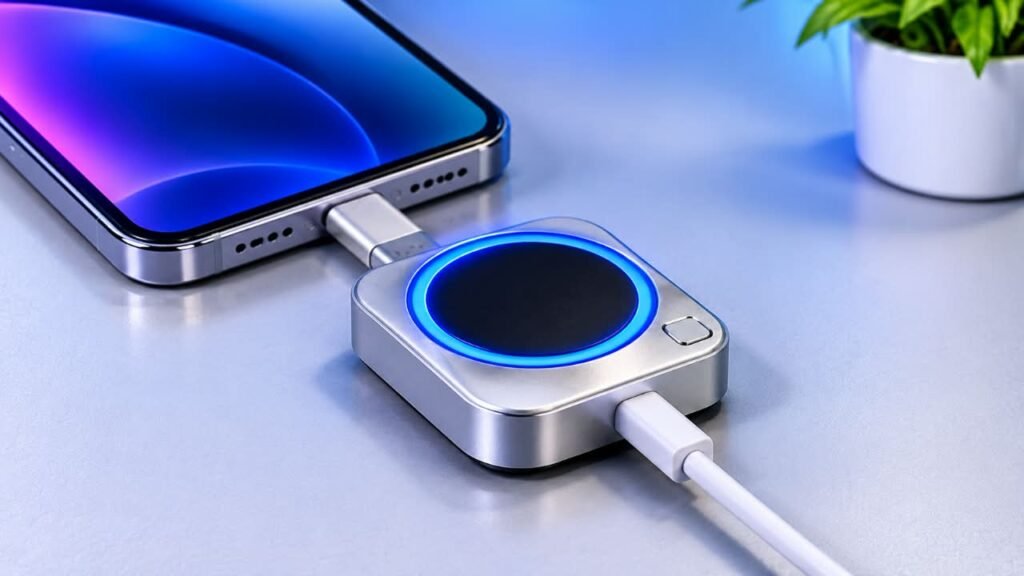
One interesting accessory is the USB-C charging adapter with a blue LED ring. This compact device features a silver-colored body, a circular black center surrounded by a blue illuminated ring, a small button, and visible connector components. Its design makes it different from an ordinary charging connector.
The product demonstration shows the adapter connected to a smartphone, with a separate charging cable attached to the opposite side. The circular ring illuminates during the demonstration, creating a distinctive appearance.
But what exactly does this accessory offer? How does it connect to a smartphone, and what should buyers know before purchasing one?
In this guide, we examine its visible design, potential everyday applications, practical advantages, compatibility considerations, and important purchasing checks.
2. What Is This Product?
The product appears to be a compact USB-C charging adapter designed to connect a smartphone and a charging cable through a small intermediate accessory.
Unlike an ordinary USB-C cable, this device has a separate body with a circular illuminated section on its front. It also features a small physical button and connector components positioned on different sides.
Based on the supplied video, the accessory can be connected between a smartphone and a charging cable. The demonstration shows a phone connected to the adapter while a separate cable provides the external connection.
Its main visible characteristics include:
- A compact, square-shaped design.
- A silver-colored exterior.
- A circular black center.
- A blue LED-style illuminated ring.
- A small physical button.
- A USB-C-style connector visible in the demonstration.
- A separate cable connection.
The precise internal technology and additional electrical functions cannot be confirmed from the available product demonstration.
3. Design and Build Overview
More detail view video
Compact and Modern Appearance
One of the first things that attracts attention is the accessory’s distinctive appearance.
Its square-shaped body has rounded corners and a metallic-looking silver finish. This gives it a modern appearance compared with conventional charging connectors.
The compact shape also makes it appear convenient to carry in a small electronics pouch, backpack, or everyday travel bag.
Circular Blue LED Ring
The most noticeable design feature is the circular section positioned in the center.
A blue illuminated ring surrounds a black circular area. During the supplied demonstration, the ring becomes visibly illuminated.
This lighting gives the accessory a recognizable appearance and may help users identify its operating or connection state. However, the exact meaning of the illumination has not been verified.
Physical Button
A small button is positioned near the circular section.
Although the video shows the button being pressed, its exact purpose is not established. Buyers should consult the manufacturer’s instructions before assuming that it controls charging, lighting, or another function.
Connector Arrangement
The product has visible connector components on opposite sides.
The demonstration shows a connector attaching to a smartphone and a separate cable connecting to the adapter. This arrangement is important because it suggests a pass-through charging setup rather than a conventional standalone cable.
4. Main Features and Functions
The following features are based on the supplied photographs and video rather than unverified manufacturer specifications.
4.1 LED-Style Lighting
The blue circular ring is the accessory’s most distinctive visual feature.
It makes the product look different from ordinary charging adapters. The illuminated ring may also serve as a visual indicator, although its precise status meanings require confirmation.
4.2 Compact Connector Design
The product combines its visible connectors and circular display in one small housing.
This design could be useful for people who prefer compact accessories instead of carrying several separate adapters.
4.3 Smartphone Connection
The video demonstrates the accessory attached to a smartphone through a connector.
This provides a practical example of how the product may be used in a charging setup.
4.4 Separate Charging Cable Connection
Another visible feature is the connection point for an external cable.
This arrangement allows the adapter to sit between the phone and the cable. Buyers should verify the supported cable type and electrical specifications before using it.
4.5 Small Physical Control
The front-facing button adds another control element to the design.
Its functionality should be checked in the product manual or confirmed with the seller.
5. How Does It Work?
Based on the supplied demonstration, the accessory appears to work as an intermediate connection between a smartphone and a charging cable.
A typical setup would involve the following steps:
- Check that the adapter connector matches the smartphone’s charging port.
- Connect the adapter to the smartphone.
- Attach the appropriate charging cable to the adapter’s opposite connection point.
- Connect the other end of the cable to a compatible power source.
- Check the smartphone display to confirm whether charging has started.
- Observe the blue illuminated ring, without assuming a particular status meaning unless the instructions explain it.
The actual connection process may vary depending on the model and its supplied accessories.
Importantly, the product should not be assumed to support wireless charging, a particular fast-charging standard, or a specific power output without manufacturer documentation.
6. Practical Uses and Everyday Applications
Everyday Smartphone Charging
The most obvious potential application is connecting a smartphone to a charging cable.
Its separate housing and illuminated ring provide an alternative design to traditional connectors.
Home and Office Use
People who regularly charge their smartphones at home or at work may find this type of accessory interesting.
It can potentially be incorporated into an existing charging setup, provided the cable, phone, and power source are compatible.
Travel and Portability
Its small form factor makes it potentially suitable for travel.
Instead of carrying a large accessory, users may be able to keep this compact connector in their everyday electronics pouch.
Desk Accessories
For people who enjoy modern-looking technology products, the blue illuminated ring may add a distinctive appearance to a desk charging setup.
However, the accessory should be purchased for its verified functionality rather than its appearance alone.
7. Benefits and Advantages
This USB-C charging adapter has several potential advantages worth considering.
1. Distinctive appearance: The circular blue LED-style ring gives it a modern appearance.
2. Compact construction: Its small body appears convenient for everyday carrying.
3. Separate cable connection: The visible arrangement allows an external charging cable to connect through the adapter.
4. Physical control: The small button provides an additional control element, although its purpose needs confirmation.
5. Alternative to ordinary connectors: Its unusual design may appeal to people interested in different smartphone accessories.
6. Potential everyday convenience: If the connector and electrical specifications match the user’s equipment, it may provide another option for connecting a phone to a charging cable.
The actual charging benefits will depend on the adapter’s internal electronics and verified technical specifications.
8. Compatibility Considerations
Compatibility is one of the most important things to investigate before purchasing this accessory.
Although a USB-C-style connector is visible, this does not automatically mean that the product works with every USB-C smartphone.
Different phones and charging accessories can support different charging protocols, electrical requirements, and connector arrangements.
Before buying, check the following:
- Whether the adapter supports your smartphone model.
- Whether its connector is USB-C or another connector type.
- Whether the external cable connection matches your charging cable.
- Whether the adapter supports your phone’s required charging protocol.
- Whether the manufacturer specifies a maximum supported power output.
- Whether the accessory supports the intended charging and data functions.
Also, do not assume that an adapter supporting physical USB-C connections necessarily supports data transfer.
Compatibility should be confirmed through the manufacturer’s specifications or a reliable seller.
9. Important Things to Check Before Buying
A product can look impressive in a demonstration, but buyers should investigate its technical details before spending money.
Here are some important considerations.
Charging Speed
Ask the seller about the supported charging wattage and charging protocols.
Avoid assuming that the illuminated ring or unusual design means faster charging.
Connector Type
Confirm the exact connector arrangement. Make sure it matches your smartphone and charging cable.
LED Function
Ask whether the blue ring indicates charging, power availability, connection status, or simply provides decorative illumination.
Button Function
Confirm what the physical button actually controls.
Product Quality
Check the housing, connector alignment, cable connection, and overall construction.
Safety and Certification
Look for genuine manufacturer documentation and applicable safety certifications.
Do not rely on unsupported claims or certification logos without verification.
Return Policy
If purchasing online, check customer reviews, seller reliability, warranty coverage, and return conditions.
These checks can help prevent compatibility problems and unnecessary expenses.
10. Pros and Cons
Pros
- Distinctive circular blue LED-style design.
- Compact and portable-looking construction.
- Separate connection for an external charging cable.
- Visible physical control button.
- Interesting alternative to ordinary charging accessories.
- Potentially convenient for compatible smartphone charging setups.
Cons
- Exact charging speed is not confirmed.
- Supported smartphone models are unknown.
- The button’s purpose is unclear.
- The meaning of the LED illumination is unverified.
- Safety certifications have not been established.
- Additional charging and data functions are not confirmed.
11. Who Should Consider Buying It?
This accessory may interest several types of technology users.
Smartphone users: People looking for a different type of charging connection may find its design interesting.
Gadget enthusiasts: The unusual circular LED appearance may appeal to people who enjoy exploring new electronic accessories.
Frequent travelers: Its compact appearance could make it suitable for an electronics travel pouch.
Technology accessory collectors: People who enjoy testing different charging connectors and smartphone accessories may want to investigate it.
Online gadget shoppers: Buyers interested in unusual charging accessories can compare this product with conventional adapters.
However, anyone who prioritizes charging speed, guaranteed compatibility, or certified electrical protection should verify the specifications before purchasing.
12. Frequently Asked Questions
Q1. What is a USB-C charging adapter with a blue LED ring?
It is a compact charging accessory featuring a silver-colored body, a circular blue illuminated ring, and visible connector components. The supplied demonstration shows it connecting a smartphone and an external charging cable.
Q2. Does this adapter support fast charging?
The available photographs and video do not confirm fast-charging support. Buyers should check the manufacturer’s stated wattage and supported charging protocols.
Q3. Is this a wireless charging device?
Wireless charging functionality has not been established. The supplied video demonstrates a physical connector and a separate cable connection.
Q4. Does the blue LED ring indicate charging status?
The ring illuminates during the demonstration, but its exact purpose is unknown. Check the product manual to understand its lighting behavior.
Q5. Can it work with every USB-C smartphone?
Not necessarily. Compatibility depends on the connector arrangement, supported electrical specifications, and the smartphone model.
Q6. What is the purpose of the small button?
The button is visible on the front of the device, but its function cannot be confirmed from the demonstration. Ask the manufacturer or seller for instructions.
Q7. What should I check before purchasing this charging accessory?
Check the connector type, supported phone models, charging wattage, charging protocols, LED function, button operation, safety documentation, and return policy.
13. Final Verdict and Conclusion
The USB-C charging adapter with a blue LED ring is an interesting smartphone accessory with a distinctive design.
Its compact silver-colored housing, circular illuminated ring, physical button, and separate cable connection make it visually different from conventional charging connectors.
The supplied demonstration provides a useful look at its physical design and shows how it can be connected to a smartphone and an external cable.
Its potential appeal comes from its unusual appearance and compact connector arrangement. It may interest gadget enthusiasts, smartphone users, and people who enjoy exploring alternative charging accessories.
However, appearance alone is not enough to determine whether an electronic accessory is worth purchasing.
Important details, including charging speed, supported protocols, exact compatibility, safety certifications, and the functions of its button and illuminated ring, still need manufacturer confirmation.
Our final recommendation: Consider this product an interesting charging accessory worth investigating, but verify its technical specifications and compatibility before buying. A well-designed charging accessory should offer dependable functionality, not just an attractive appearance.
As with any smartphone charging product, choosing a compatible and properly documented accessory is the best way to make an informed purchasing decision.